

It’s March. You’re staring at a client’s books that should’ve been tax-ready two weeks ago. The T2 deadline is creeping.
The GST return is queued. And the problem isn’t some obscure CRA rule or a tricky tax election.
It’s the bank rec.
The transactions don’t tie out. There’s a $347 variance nobody can explain.
Three months of credit card activity got lumped into “miscellaneous.” And the opening balance?
Off by a number that’s been quietly compounding since July.
I’ve watched this pattern repeat across dozens of client files. Tax delays almost never come from tax complexity.
They come from messy books. And messy books almost always trace back to bank reconciliation errors — the kind that seem minor in isolation but create absolute chaos at year-end.
By the end of this guide, you’ll be able to identify the 8 most common reconciliation mistakes that delay Canadian tax filings, fix each one with a practical workflow, and build a pre-filing checklist that keeps your books clean.
What Are Common Bank Reconciliation Errors?
Common bank reconciliation errors include:
- Missing transactions not recorded in the general ledger
- Duplicate entries from bank feed import glitches
- Incorrect categorization of expenses and revenue
- Unreconciled opening balances carried forward with errors
- Ignoring small discrepancies that compound over time
- Mixing personal and business expenses in one account
- Doing reconciliation only at year-end instead of monthly
- Mishandling credit card transactions and statement timing
These bookkeeping errors before tax filing create inaccurate financial statements, increase review time, and directly delay T2 and GST/HST filings for Canadian accounting firms.
Why Do Reconciliation Errors Delay Tax Filing?
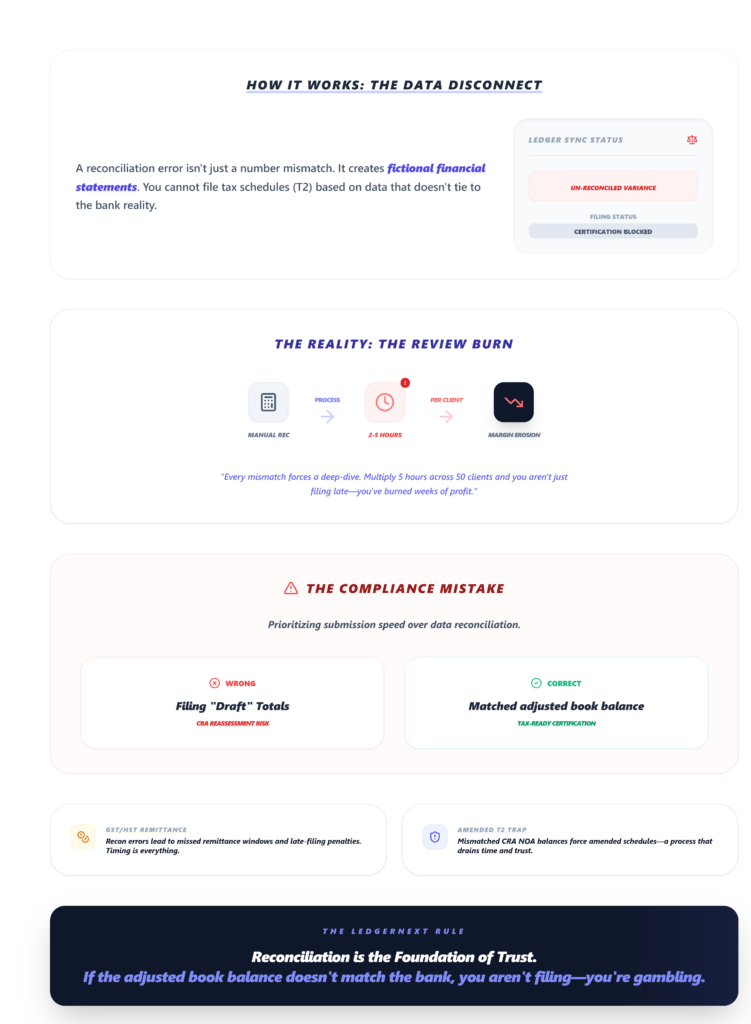
Here’s what actually happens when your bank rec is off.
Incorrect financial statements. Your trial balance doesn’t tie to reality. Revenue is overstated or understated.
Expenses are in the wrong buckets. The T2 schedules you’re trying to prepare are built on bad data — and you can’t file what you can’t trust.
Extra review time. Every variance means someone has to dig.
Research data shows firms using manual recs report 2–5 hours of delay per client monthly just hunting down mismatches.
Multiply that across 40 or 50 client files and you’ve burned weeks.
Filing delays. When the adjusted book balance doesn’t match the bank, you can’t certify tax-ready financials. T2 returns get pushed.
GST/HST remittances miss their window. And if you’re handling QST in Quebec, that’s another layer of timing pressure.
Compliance risks. CRA doesn’t care why your return is late.
Rec errors that misstate taxable income can trigger reassessments, and mismatched CRA NOA balances have forced firms I know into amended T2 schedules — which nobody enjoys.
The 8 Bank Reconciliation Errors That Create the Most Damage
1. Missing Transactions
The problem: Transactions hit the bank account but never make it into the GL.
Common culprits are automated debits, EFTs clients forget to mention, and wire fees that ghost through without notification.
Why it delays filing: Missing transactions overstate or understate cash.
Your adjusted book balance is wrong, which means every downstream report — income statement, balance sheet, tax schedules — is off.
I’ve seen a single unrecorded $5K EFT push an entire T2 deadline.
The fix: Download the full-year bank CSV. Run a VLOOKUP against your GL export.
Flag any line — especially items under $100 tagged as “SVC CHG” or “WIRE FEE” — that doesn’t have a match.
These ghost lines are almost always the culprit.
Visual checkpoint: When your VLOOKUP returns zero unmatched rows, you’re clear. If you’re seeing yellow or orange cells, stop and review manually.
2. Duplicate Entries
The problem: Bank feed imports in QuickBooks or Xero sometimes create dupes — especially during multi-bank syncs or when transactions are both manually entered and auto-imported.
Why it delays filing: Duplicates distort 10–15% of statements in high-volume workflows and inflate expenses or revenue.
That 1–2 week audit hold while you sort it out? It’s real.
The fix: Build a pivot table summing by reference number. Any ref# appearing twice is a dupe.
Delete via batch edit, then re-run the trial balance. Some firms use the UNIQUE formula in Excel as a quick filter — it works surprisingly well.
Verification: Sample 20 transactions post-cleanup. If more than 2% still show duplicates, re-import the bank feed from scratch.
3. Incorrect Categorization
The problem: A client’s office supplies get coded as “Professional Fees.” Meals end up under “Travel.”
Revenue deposits land in a liability account. It happens constantly, especially when multiple team members touch the same file.
Why it delays filing: Wrong categories mean wrong tax lines.
Your T2125 or T776 won’t tie to the GL without manual adjustments.
And GST filing errors in bookkeeping — like coding a zero-rated supply as taxable — can trigger CRA review.
The fix: Establish rule-based categorization at the start of each engagement.
If a vendor always charges for the same thing, set a rule so it auto-categorizes going forward.
Then run a category audit quarterly — not just at year-end.
4. Unreconciled Opening Balances
The problem: You inherit a client file, or switch accounting software mid-year, and the opening balance doesn’t match the prior period’s closing.
Sometimes it’s off by pennies. Sometimes it’s off by thousands.
Why it delays filing: Every transaction you reconcile from that point forward carries the error.
By December, the variance has compounded, and you’re reverse-engineering months of data to find where it broke.
The fix: Before you touch a single current-period transaction, verify the opening balance against the prior year’s bank statement and GL close.
If variance exceeds 0.5%, stop. Don’t proceed until it’s resolved.
Verification: Compare your adjusted trial balance to the prior month. If the variance is under 0.5%, go.
If it’s over, you’ve got a timing diff or a data migration issue that needs manual review.
5. Ignoring Small Discrepancies
The problem: A $3 variance. A $12 rounding difference. A $0.47 FX adjustment nobody bothered to post.
These get waved off as immaterial.
Why it delays filing: Small discrepancies compound. By month 8, that $3 is now a $200+ mystery, and you’re spending hours tracing it back through bank statement cutoff misalignments.
I’ve seen a $1 rounding error cascade into a full re-reconciliation because nobody used 2-decimal precision consistently.
The fix: Resolve every variance at the time of reconciliation. If it’s under $5, post an adjusting entry immediately.
Don’t carry it forward. The 30 seconds it takes now saves 3 hours later.
6. Mixing Personal and Business Expenses
The problem: Small business clients — especially sole proprietors — run personal charges through business accounts.
Groceries, Netflix, personal insurance. It all lands in the bank feed.
Why it delays filing: You can’t file a T2 or prepare a T2125 with personal expenses embedded in business categories.
Every mixed transaction requires manual review, reclassification, and sometimes a shareholder loan adjustment.
For firms managing multiple clients, this is a massive time sink.
The fix: Set up a flagging rule for common personal merchants (grocery chains, streaming services, personal insurance providers).
Review flagged items monthly. And have the uncomfortable conversation with clients early — ideally during onboarding — about keeping accounts separate.
7. Doing Reconciliation at Year-End Only
The problem: Some firms — or their clients — treat reconciliation as an annual event.
Twelve months of transactions, unreviewed, dumped on the accountant’s desk in February.
Why it delays filing: Annual reconciliation means annual error discovery.
Timing diffs from ACH settlement delays, payroll clears that took 3–5 days, outstanding deposits in transit — all of it piles up.
Data shows manual recs carry a 15–20% error rate in data entry. Compounding that over 12 months is brutal.
The fix: Reconcile monthly. Period. Even a quick pass — checking that the adjusted bank balance ties to the book balance — catches issues before they metastasize.
Weekly is even better for high-transaction clients. Maintain a “pending clears” tab with expected settlement dates to preempt those timing diffs.
Visual checkpoint: Your reconciliation dashboard should show a green “Reconciled” status for every month. If any month shows “Unreconciled” past the 15th of the following month, that’s your red flag.
8. Mishandling Credit Card Transactions
The problem: Credit card statements have different cutoff dates than bank statements. Transactions post on different days.
Returns and chargebacks create negative entries that confuse auto-matching. And some firms reconcile credit cards against the payment to the credit card company rather than against individual transactions.
Why it delays filing: Mishandled credit card recs create phantom variances.
Expenses get double-counted (once on the credit card, once when the payment clears the bank). Or they get missed entirely.
Either way, your T2 preparation errors multiply.
The fix: Reconcile credit cards as separate accounts with their own statement cutoff dates.
Match individual transactions — not just the lump payment. And watch for returns: a $500 purchase followed by a $500 return should net to zero, not show as two separate $500 entries.
Real Impact on Accounting Firms
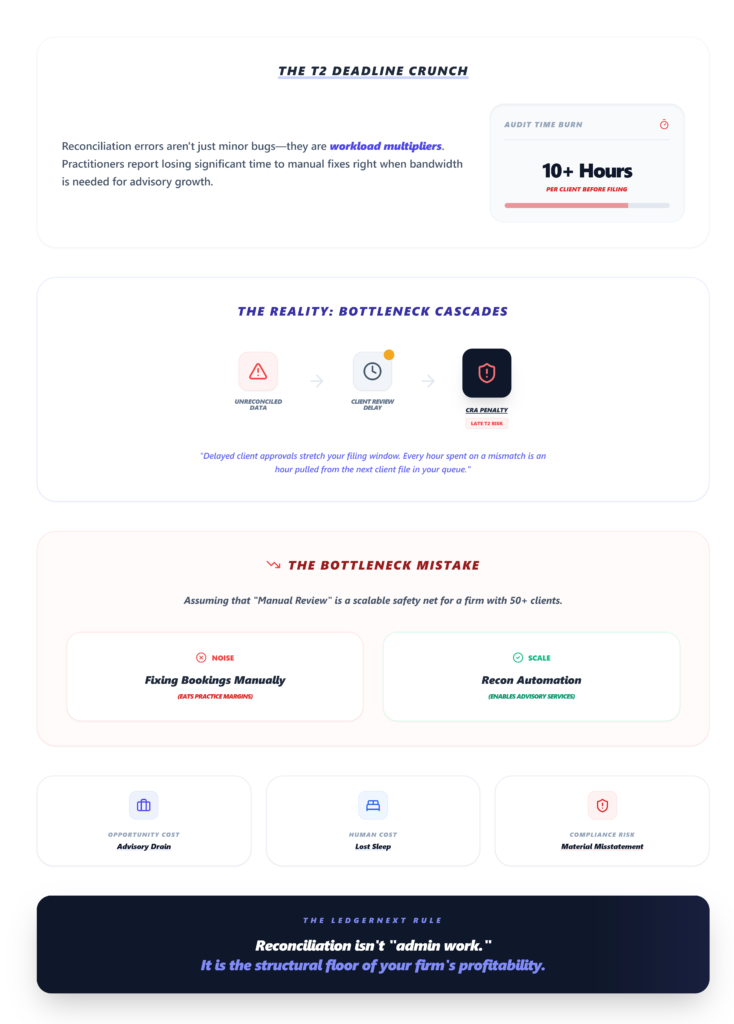
These aren’t theoretical problems. They hit your practice directly.
Increased workload. Practitioners report spending 10+ hours per client on rec fixes before the T2 deadline.
That’s time pulled from advisory work, new client onboarding, or — honestly — sleep.
Delayed client approvals. When you send financials back for client review because the numbers look wrong, the approval cycle stretches.
And clients who don’t respond quickly? That pushes everything further.
CRA penalties. Late T2 filings incur penalties. Late GST/HST remittances incur interest.
And if a reconciliation error causes a material misstatement, you’re looking at potential reassessment.
Reduced efficiency. Every hour spent fixing a bank rec error is an hour not spent on the next client file.
For firms managing 50+ client books, the bottleneck effect is real.
How Modern Accounting Firms Avoid These Errors
The firms I’ve seen handle tax season smoothly share a common trait: they’ve moved past manual reconciliation workflows.
Automated bank statement processing. Instead of manually entering transactions from PDFs or CSVs, modern bookkeeping platforms like LedgerNext ingest raw bank statements and convert them into categorized, GL-ready data.
That eliminates the manual data entry errors that cause 15–20% of rec mismatches.
Rule-based categorization. Set a rule once — “All payments to Staples go to Office Supplies” — and it applies across every future import.
This kills the inconsistent categorization problem across team members and client files.
Bulk corrections. When you do find errors — and you will — the ability to batch-edit transactions rather than fixing them one by one cuts correction time dramatically.
Pivot tables in Excel work, but purpose-built tools handle this at scale.
Real-time reconciliation. Rather than waiting for month-end close, platforms that support continuous matching flag discrepancies as they appear.
You’re resolving a $12 variance today instead of a $1,200 mystery in March.
Ready to see how automation fits your workflow?
LedgerNext converts messy bank statements into tax-ready financial data for Canadian accounting firms.
If you’re managing multiple client books and tired of manual rec cleanup, explore the platform features or request a demo to see it in action.
Bank Reconciliation Checklist Before Tax Filing
Use this before submitting any T2 or GST/HST return:
- ☐ All bank accounts reconciled through the fiscal year-end date
- ☐ No duplicate transactions — pivot table check completed
- ☐ Categories verified against tax line mappings (T2125, T776, GST schedules)
- ☐ Opening balances confirmed against prior year closing
- ☐ Credit cards reconciled separately with correct cutoff dates
- ☐ Personal expenses flagged and reclassified
- ☐ Small discrepancies resolved — no variances carried forward
- ☐ Uncleared items reviewed — nothing outstanding over 90 days
- ☐ Tax export simulated — cash ties to tax schedules without manual adjustments
If any box is unchecked, stop. Fix it before filing.
FAQs
How long does bank reconciliation take per client?
Manual reconciliation takes 4–8 hours per client monthly. With bank reconciliation automation and rule-based matching, firms reduce this to roughly 1 hour — achieving tax-ready financial data in 2–4 weeks post-year-end instead of 2–3 months.
Why does my reconciliation balance but the tax export still fails?
Timing diffs hide variances. ACH settlement delays of 3–5 days mean your rec ties to the statement date but not the recon cutoff your tax software uses.
Reconcile to the fiscal year-end cutoff date, not the bank statement end date.
How do I handle duplicate imports from QuickBooks or Xero bank feeds?
Run a pivot table summing by reference number. Any ref# appearing more than once is a dupe.
Use batch edit to remove duplicates, then re-validate your trial balance totals. Platforms with built-in de-duplication handle this automatically during import.
What’s the fastest way to find missing bank fees in a reconciliation?
Download the detailed bank log — not the summary statement.
VLOOKUP keywords like “SVC CHG,” “NSF,” and “WIRE FEE” against your GL. Any unmatched items need adjusting journal entries before close.
How do firms manage reconciliation across 50+ clients efficiently?
Integrate bank APIs for automated statement ingestion, set categorization rules that apply across client files, and use a centralized dashboard to track reconciliation progress. Managing multiple clients from one platform eliminates the spreadsheet chaos that slows everything down.
Your tax filing speed is only as good as your reconciliation.
Every missing transaction, every duplicate, every $3 variance you carry forward — it all compounds into the kind of mess that turns a straightforward T2 into a two-month project.
Fix the rec, and the tax filing takes care of itself.